
Last Updated on Sep 2, 2026 by Aishika Banerjee
Table of Contents
What Is a Demat Holding Statement?
It’s an official, date-stamped record of every security in your demat account. If you’re new to the term, see our full breakdown of what a demat holding statement is and why it matters — here, we’ll focus on exactly how to pull it on Kotak Neo.
Why You Need Your Kotak Neo Holding Statement
Tracking your portfolio
Kotak Neo’s DP/Demat Holdings sits inside a broader Reports & Statements panel, separate from your live trading portfolio view — so it’s the one to check when you want an official record of what’s actually sitting in your linked demat account, rather than your real-time positions.
Filing your ITR / calculating capital gains
This is where Kotak Neo stands out from most brokers: the same Reports & Statements panel gives you a purpose-built Capital Gains Report (tax filing) — a quarter-wise summary made specifically for ITR — plus a Realised Gain & Loss Statement for date-wise realised P&L across equity, derivatives, currency, and mutual funds. You don’t need to reconstruct these numbers from your holdings statement yourself; pull the dedicated report instead.
How to Download Your Holding Statement on Kotak Neo Web?
Step 1:
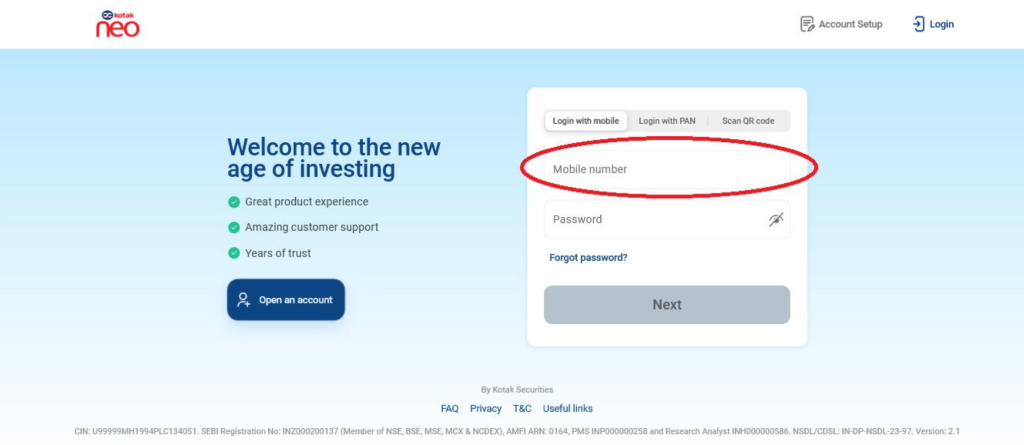
Log in: Go to the Kotak Neo web trading portal at ntrade.kotakneo.com and log in with your credentials.
Log in to ntrade.kotakneo.com using your mobile number or PAN.
Step 2:
Click your Profile icon: Once logged in, go to the Profile icon, then choose Reports.
Step 3:
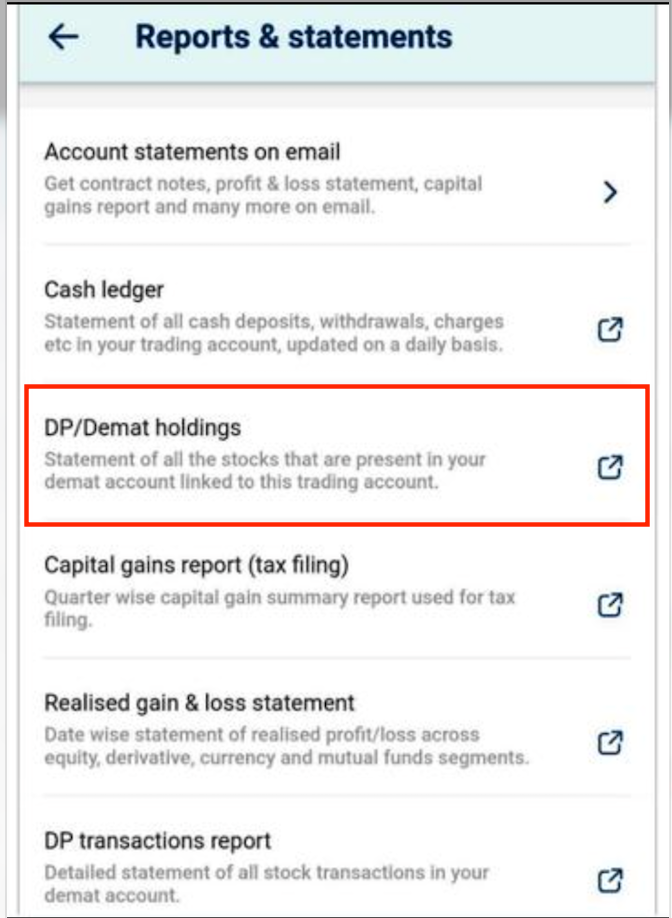
Select DP/Demat Holdings: In the Reports & Statements panel that opens, click DP/Demat Holdings — the statement of all stocks present in your demat account linked to your trading account.
Select “DP/Demat Holdings” from the Reports & Statements panel.
Step 4:
Download: Click the Excel/PDF download icon to download the statement directly.
FAQs
1. What’s the difference between DP/Demat holdings and a capital gains report on Kotak Neo?
DP/Demat holdings shows a snapshot of what you currently hold in your demat account. The capital gains report is a separate, quarter-wise summary built specifically for tax filing, calculating your realised gains and losses.
2. Can I view my Kotak Neo demat holdings from the mobile app, or only on the web?
Both. From the app’s profile section or the Portfolio → Investments tab, tapping DP/Demat Holdings redirects you to the same holdings view on the Kotak Neo web platform.
3. In what format can I download my Kotak Neo holding statement?
You can download it directly as a PDF or Excel file using the download icon on the DP/Demat Holdings page.
4. Is the DP/Demat holdings report the same as my trading account portfolio?
Not exactly — your trading portfolio view reflects live positions and valuations, while the DP/Demat holdings statement is an official record of the stocks and mutual fund units held in your linked demat account as of a given date.
5. Can I use my Kotak Neo holding statement for tax filing or capital gains calculation?
You can, but Kotak Neo’s dedicated Capital Gains Report (tax filing) and Realised Gain & Loss Statement — both in the same Reports & Statements panel — are built specifically for this and are more directly usable for ITR filing than the holdings statement alone.
6. Where else can I access account statements on Kotak Neo besides DP/Demat holdings?
The same Reports & Statements panel also has Account Statements on Email (contract notes, P&L, capital gains), Cash Ledger, Realised Gain & Loss Statement, and DP Transactions Report.

- US ETFs: A Complete Guide for Indian Investors - Sep 30, 2026
- US Stock Futures: Meaning, Timings and How Indian Investors Read Them - Sep 11, 2026
- How to Download Your IndMoney (INDstocks) Demat Holding Statement? - Sep 2, 2026