
Last Updated on Sep 21, 2026 by Aishika Banerjee
Table of Contents
What Is a Demat Holding Statement?
It’s an official, date-stamped record of every security in your demat account. If you’re new to the term, see our full breakdown of what a demat holding statement is and why it matters — here, we’ll focus on exactly how to pull it on IndMoney’s INDstocks platform.
Why You Need Your IndMoney Holding Statement
Tracking your portfolio
IndMoney’s Networth and Tax Centre screens are built for a live, at-a-glance view of your money across stocks, mutual funds, and other assets — useful day-to-day, but not a formal record. The Holding Statement inside INDstocks’ own reports section is the one to pull when you need an official, date-stamped snapshot of exactly what’s sitting in your linked demat account, separate from the live portfolio view.
Filing your ITR / calculating capital gains
The same Indian Stock Reports section also has a dedicated Tax P&L Report — broken down financial-year-wise with Long Term, Short Term, F&O, Intraday and Dividend heads, mapped to the right ITR schedule — plus a separate Dividend Report. You don’t need to reconstruct capital gains from your holdings; pull the Tax P&L Report for that and use the Holding Statement as supporting documentation of what you actually held.
How to Download Your Holding Statement on IndMoney
Step 1:
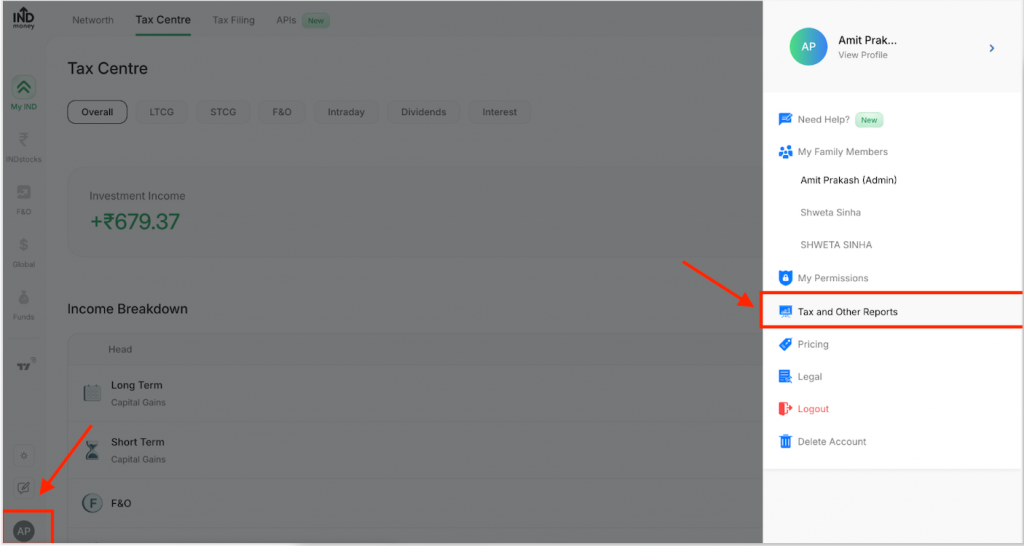
Open your profile menu: On the IndMoney web platform, click your profile icon in the bottom-left corner, then select Tax and Other Reports.
Click the profile icon at the bottom-left, then select “Tax and Other Reports.”
Step 2:
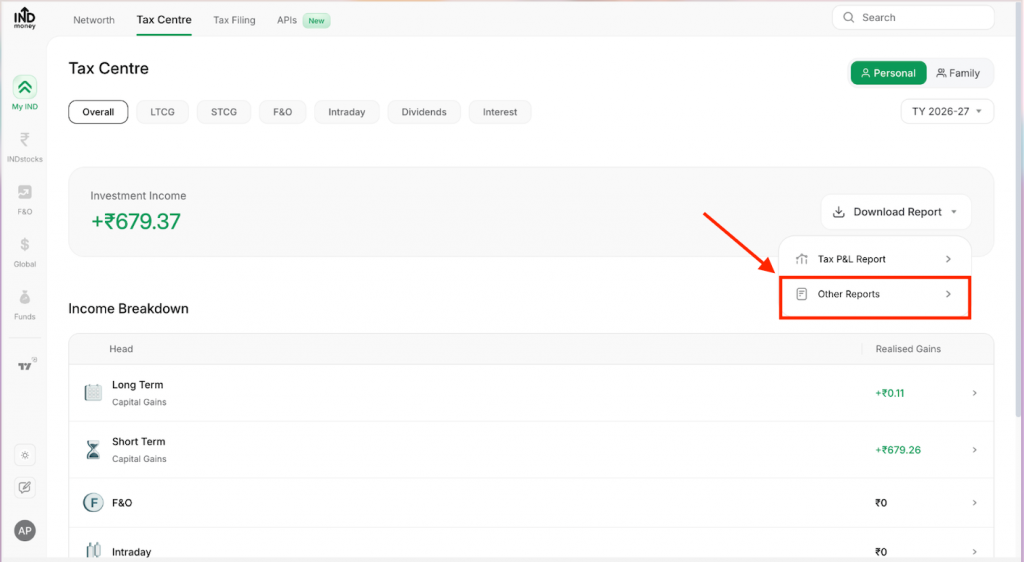
Choose Other Reports: On the Tax Centre page, click the Download Report dropdown next to Investment Income, and select Other Reports (not Tax P&L Report).
Select “Other Reports” from the Download Report dropdown.
Step 3:
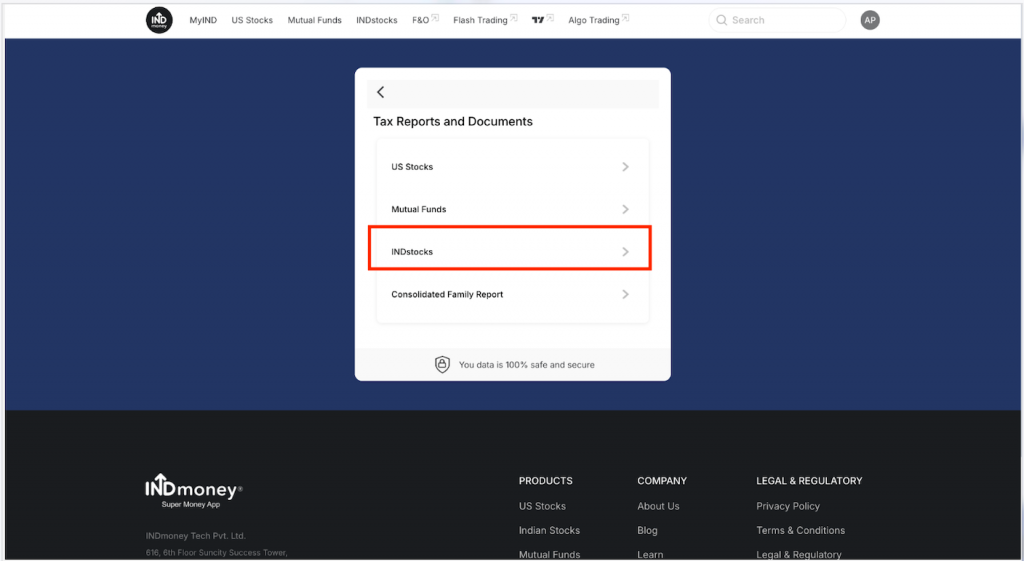
Select INDstocks: In the Tax Reports and Documents panel that opens, click INDstocks — separate from US Stocks, Mutual Funds, and the Consolidated Family Report.
Choose “INDstocks” from the Tax Reports and Documents panel.
Step 4:
Download your Holding Statement: You’re redirected to the Indian Stock Reports page. Scroll down to the Holding Statement section and click Download next to the latest financial year (e.g., FY 26-27).
Scroll to “Holding Statement” and click Download next to the latest year’s report.

FAQs
1. What’s the difference between the Tax P&L Report and the Holding Statement on IndMoney?
The Tax P&L Report gives you your realised and unrealised gains — Long Term, Short Term, F&O, Intraday and Dividends — mapped to ITR schedules. The Holding Statement, a separate download in the same Indian Stock Reports section, is the depository-style record of what you currently hold, not your gains or losses.
2. Why do I need to click “Other Reports” instead of the Tax P&L Report option?
The Download Report dropdown on the Tax Centre page splits your downloads into two groups — Tax P&L Report for gains/losses, and Other Reports for everything else, including the Holding Statement, Dividend Report, and reports for your other linked assets like US Stocks and Mutual Funds.
3. Can I download my IndMoney holding statement for a past financial year, not just the latest one?
Yes — the Holding Statement section on the Indian Stock Reports page lists multiple financial years (for example FY 26-27, FY 25-26, and earlier), each with its own Download or View Report link.
4. Is the INDstocks Holding Statement the same as my IndMoney portfolio or Networth view?
Not exactly — your Networth and portfolio screens reflect live, real-time valuations, while the Holding Statement is an official record of the stocks and mutual fund units held in your linked demat account as of a given date.
5. Can I use this report to file my ITR or calculate capital gains?
You can use it as supporting documentation of your holdings, but the dedicated Tax P&L Report in the same Indian Stock Reports section — with figures already mapped to ITR schedules — is the more direct route for the actual capital gains computation.
6. Does IndMoney give me reports for US Stocks and Mutual Funds too, or only INDstocks?
All three are covered — the Tax Reports and Documents panel (Profile → Tax and Other Reports → Other Reports) has separate sections for US Stocks, Mutual Funds, INDstocks, and a Consolidated Family Report if you manage holdings for family members on the same account.

- US ETFs: A Complete Guide for Indian Investors - Sep 30, 2026
- US Stock Futures: Meaning, Timings and How Indian Investors Read Them - Sep 11, 2026
- How to Download Your IndMoney (INDstocks) Demat Holding Statement? - Sep 2, 2026