
Last Updated on Sep 2, 2026 by Aishika Banerjee
Table of Contents
What Is a Demat Holding Statement?
On Axis Direct, your demat holding statement is generated straight from the Demat Reports & Services section of SimpleHai — a snapshot of every security in your linked demat account (stocks, mutual fund units, ETFs) as of a chosen date, showing the company name, ISIN, free quantity, total quantity, and current valuation for each. Axis Direct lets you pull it as a PDF, an Excel file, or have it emailed to your registered address, so it works equally well as a quick on-screen check or an offline record.
Why You Need Your Axis Direct Holding Statement
Tracking your portfolio
Because the report is date-stamped and pulls from your actual linked demat account (not just your live trading view), it’s the most reliable way to reconcile what SimpleHai shows you day-to-day against your official holdings — useful before you place a large order, or just to keep a periodic offline record.
Filing your ITR / calculating capital gains
Axis Direct doesn’t bundle a dedicated capital gains report into this particular download — for that level of detail, you’d pair your holding statement with your Contract Note or Ledger from the same Reports & Services menu. But the holding statement itself is still useful supporting documentation: it confirms exactly what you held and its valuation as of a given date, which is handy when you’re reconciling numbers for your return.
How to Download Your Holding Statement on Axis Direct Web (SimpleHai)?
Step 1:
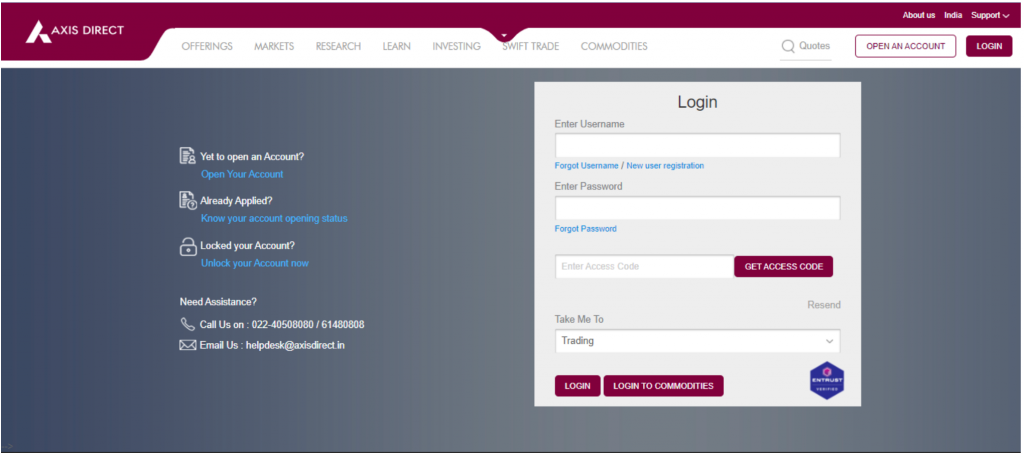
Log in to your account: Go to simplehai.axisdirect.in and log in with your username and password.
Log in at simplehai.axisdirect.in with your registered username and password.
Step 2:
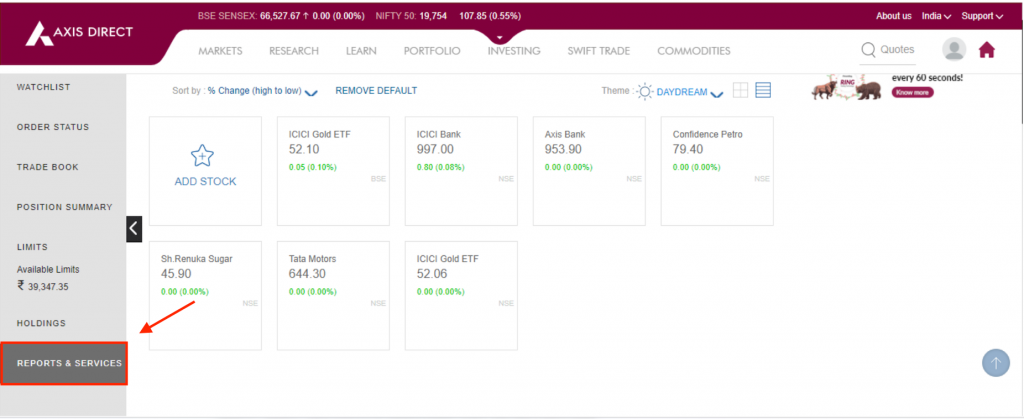
Open Reports & Services: From the left-hand menu bar, click Reports & Services.
Select “Reports & Services” from the left menu bar on your dashboard.
Step 3:
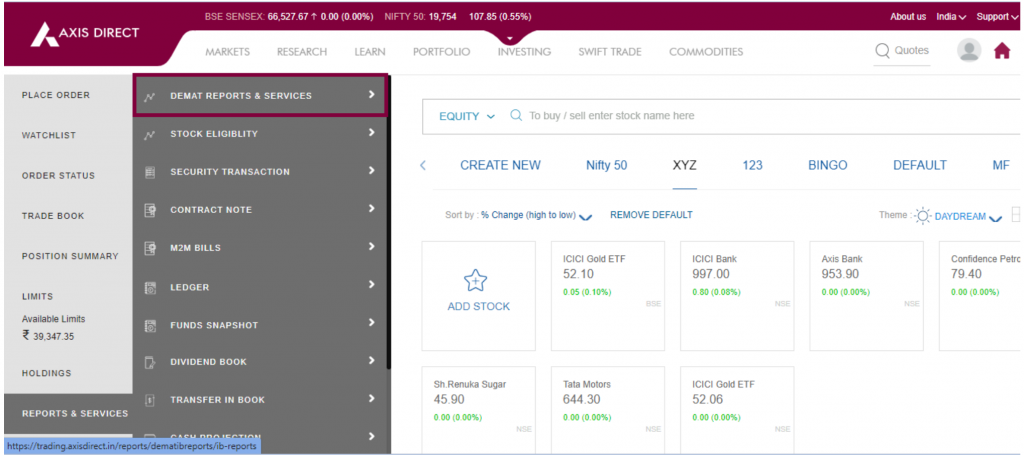
Select Demat Reports & Services: In the menu that opens, click Demat Reports & Services to proceed.
Choose “Demat Reports & Services” from the expanded menu.
Step 4:
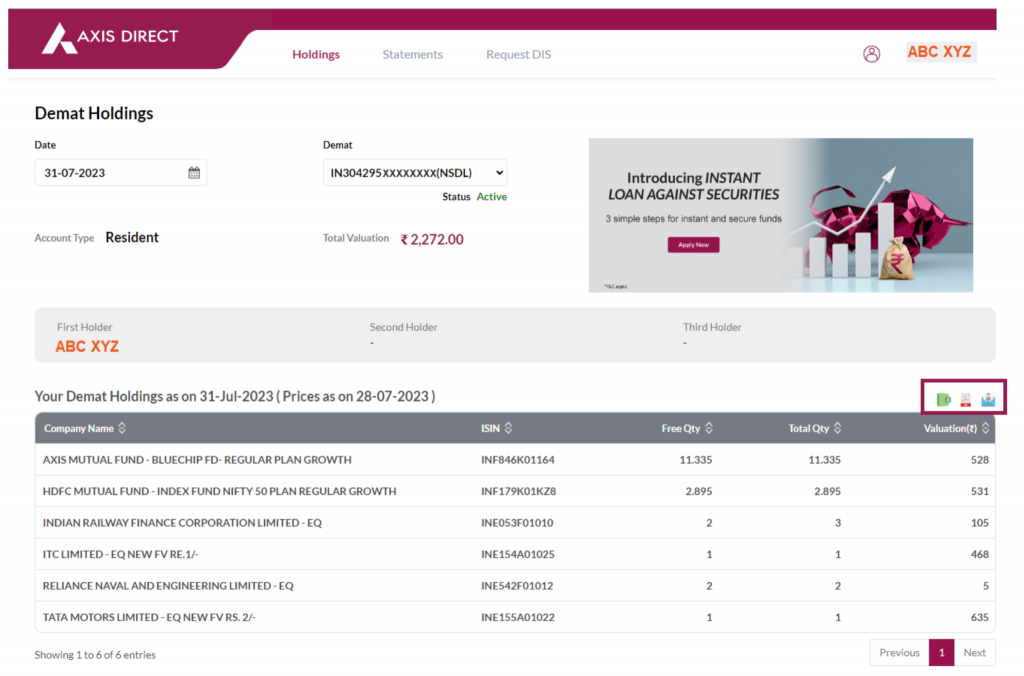
Download your statement: A new window opens showing your demat holdings. Scroll down (or look to the top-right of the holdings table) for the download options, and choose to download the report as PDF, Excel, or have it emailed to your registered email ID.
Use the Excel, PDF, or email icons above the holdings table to get your statement in the format you need.
How to Download Your Holding Statement on the Axis Direct App?
Open the Axis Direct app and go to Profile → Reports → My Reports, then request your Holding Statement. You’ll receive it by email within 12–24 hours.
FAQs
1. What’s the difference between a holding statement and a transaction statement on Axis Direct?
A holding statement shows what you currently own as of a given date; a transaction statement lists the buy/sell/transfer activity in your account over a date range.
2. Can I download my Axis Direct holding statement for a past date, not just today?
The web report defaults to today’s date. For a specific past date, you may need to select it manually on the Demat Holdings page or reach out to your Relationship Manager or Axis Direct customer care.
3. In what formats can I download the Axis Direct holding statement — PDF, Excel, or email?
All three — you can download it directly as a PDF or Excel file, or have it emailed to your registered email ID.
4. How long does it take to receive the holding statement via the Axis Direct app?
After you request it under Profile → Reports → My Reports, it’s emailed to your registered address within 12–24 hours.
5. Can I use my Axis Direct holding statement to file my ITR or calculate capital gains?
Yes, as supporting documentation — though for the actual capital gains computation, pair it with your Contract Note or Ledger, which carry the transaction-level cost details the holding statement alone doesn’t include.
6. Do I need a separate CDSL/NSDL statement, or is the Axis Direct one enough?
For most day-to-day needs (portfolio tracking, tax filing support), the Axis Direct statement is sufficient since it pulls directly from your linked demat account. You’d only need a CDSL/NSDL statement directly if you specifically require the depository’s own record.

- US ETFs: A Complete Guide for Indian Investors - Sep 30, 2026
- US Stock Futures: Meaning, Timings and How Indian Investors Read Them - Sep 11, 2026
- How to Download Your IndMoney (INDstocks) Demat Holding Statement? - Sep 2, 2026